
 by
by Introduction
A Database Management System (DBMS) is software used to store, retrieve, define, and manage data in a database. Think of it as a highly organized, digital filing cabinet that allows multiple users to access and manipulate data securely and efficiently, instead of dealing with messy, scattered files.
Here is a quick breakdown of how it works and why it matters.
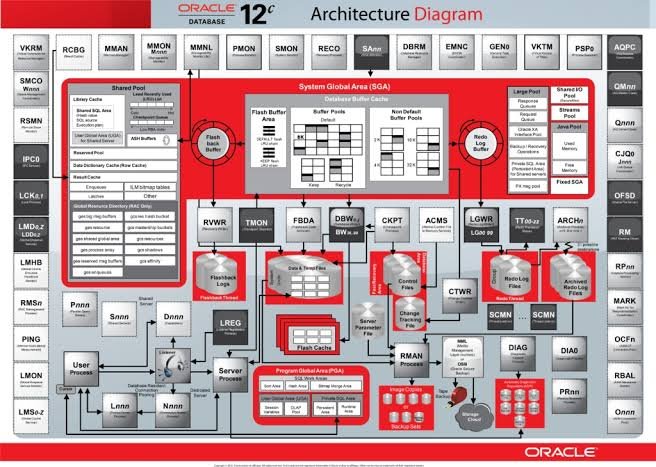
Database Management System
Core Components
A typical database system consists of three main layers:
- The Database: The physical collection of data files stored on a disk.
- The DBMS (Software): The engine that lets you insert, update, delete, and query the data.
- The Application/User: The interface (like an app or website) through which people interact with the data.
- Key Functions of a DBMS
- Data Storage & Management: It structures data so it doesn’t get corrupted or lost.
- Data Security: It restricts access, ensuring only authorized users can see or modify specific data.
- Concurrency Control: It allows thousands of people to access the same database at the same time without interfering with each other’s actions (e.g., booking a flight seat).
- Backup and Recovery: It automatically saves data and can restore it if a system crash occurs.
- Data Integrity: It enforces rules (constraints) so that the data remains accurate and reliable (e.g., preventing a phone number field from accepting letters).
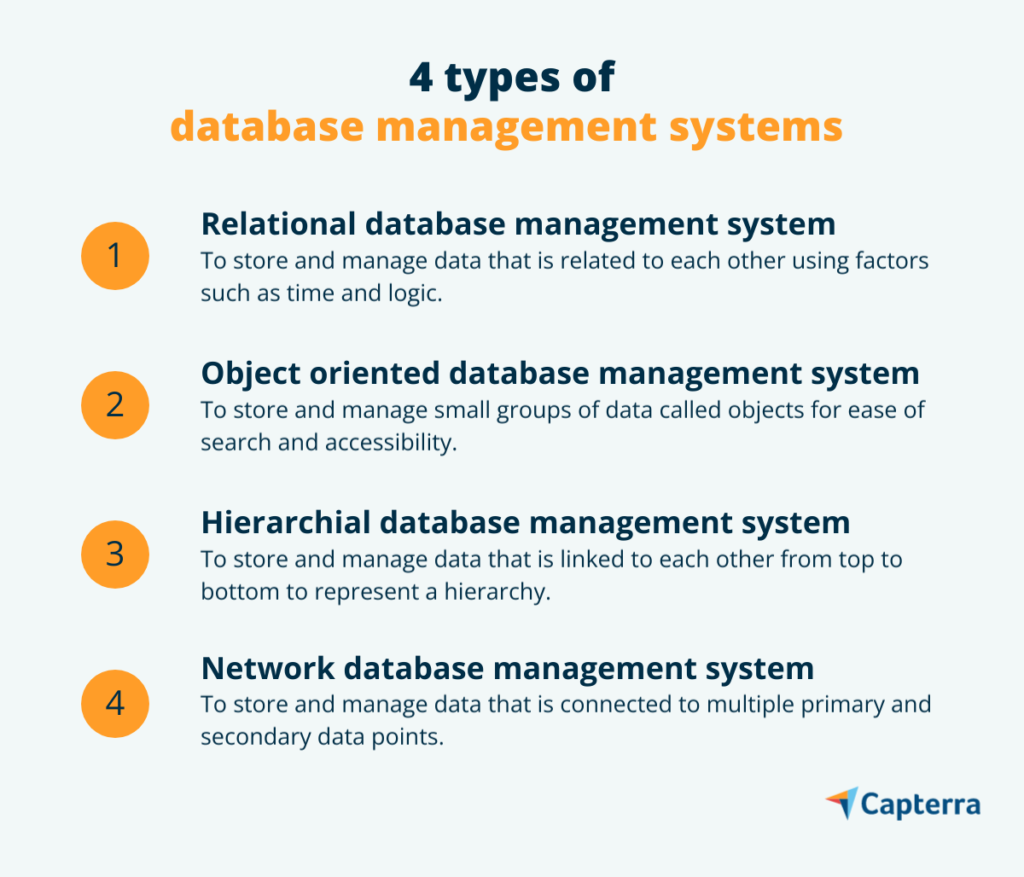
Features & Types
Main Types of Database Systems
| Type | Description | Example |
| Relational (RDBMS) | Stores data in structured tables (rows and columns) linked by relationships. Uses SQL. | MySQL, PostgreSQL, Oracle |
| Non-Relational (NoSQL) | Unstructured or semi-structured data. Ideal for massive, rapidly changing data sets. | MongoDB, Redis, Cassandra |
| Cloud Databases | Hosted on cloud platforms, offering easy scalability and flexibility. | Amazon RDS, Google Cloud Spanner |
Why Use a DBMS? (vs. Traditional Files)
Before DBMS, data was kept in independent text or excel files. This led to data redundancy (the same data saved in multiple places) and data inconsistency (updating it in one file but forgetting another). A DBMS provides a single, centralized “source of truth.”
Here is a visual and descriptive overview of how a Database Management System (DBMS) functions as the bridge between users and physical storage:
The Three-Tier Architecture
To understand how a database system operates, it helps to look at its three main layers:
- External Level (View): This is what the end-user or application sees. For example, when you log into a banking app, you only see your account balance, not the raw data files or other users’ information.
- Conceptual Level (Logical): This is managed by database administrators and developers. It defines what data is stored in the database and the relationships between that data (e.g., linking a “Customer ID” to an “Order Number”).
- Internal Level (Physical): This is the lowest level, describing how the data is actually stored on the physical hard drives or cloud servers in terms of bytes and blocks.
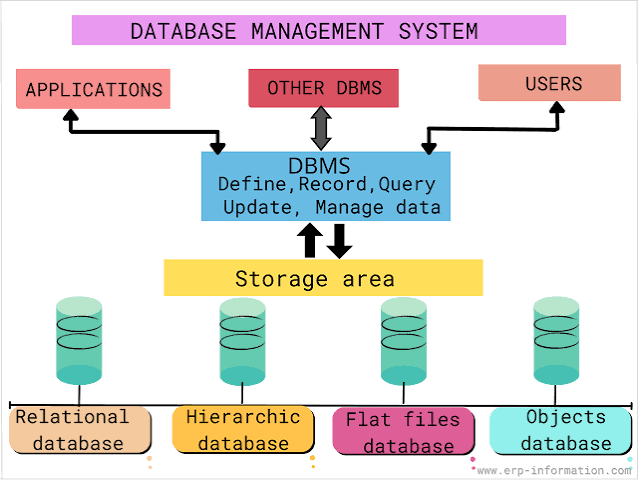
How a Query Flows
When an application requests information (like searching for a product on an e-commerce site):
The DBMS serves the data back up to the application, which displays it cleanly to the user.
The user inputs a request via the user interface.
The application translates this request into a database query (often usinghttps://wikipedia.org/wiki/SQL
The DBMS software engine receives the query, checks for user authorization, optimizes the search path, and retrieves the specific data from physical storage.
Key Features That Make DBMS Essential
If you are building a modern website or app, a DBMS is non-negotiable because it handles the heavy lifting:
Automated Backups: If the server fails, a DBMS has recovery mechanisms to ensure your website’s data isn’t permanently lost.
No More Data Redundancy: It ensures the same piece of data isn’t duplicated across multiple files, saving storage and avoiding confusion.
High Security: You can restrict access so that regular users can only see their own profile, while admins can see everything.
Concurrent Access: Thousands of users can buy products or click links at the exact same millisecond without crashing the system.
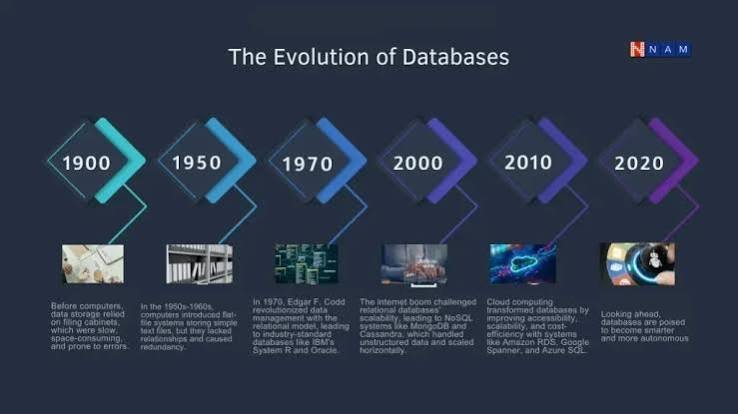
Key Features That Make DBMS Essential
If you are building a modern website or app, a DBMS is non-negotiable because it handles the heavy lifting:
- No More Data Redundancy: It ensures the same piece of data isn’t duplicated across multiple files, saving storage and avoiding confusion.
- High Security: You can restrict access so that regular users can only see their own profile, while admins can see everything.
- Concurrent Access: Thousands of users can buy products or click links at the exact same millisecond without crashing the system.
- Automated Backups: If the server fails, a DBMS has recovery mechanisms to ensure your website’s data isn’t permanently lost.
Database Management System (DBMS): A Complete Beginner’s Guide
A Database Management System is the software backbone that allows businesses and applications to store, organize, modify, and retrieve massive amounts of data efficiently and securely. If you are running a modern website—whether it is an online store, a blogging platform, or a social network—handling data manually is impossible. That is exactly where a modern Database Management System becomes essential.
In simple terms, think of it as an intelligent middleman. It sits right between the website visitor and the physical files stored on hard drives, ensuring data flows smoothly without any corruption.
Why Your Website Needs a Professional DBMS
Without a proper Database Management System, the modern internet simply could not function. From basic dynamic blogs to giant tech platforms like Facebook and Google, every single online platform relies on a database setup.
Implementing a clean Database Management System ensures that your website scales gracefully as your traffic grows, keeping your user data well-protected, organized, and accessible at lightning speed.
]] | ||
| Wikinews | [[wikinews:]] | [[n:]] |
| Wikibooks | [[wikibooks:]] | [[b:]] |
| Wikiquote | [[wikiquote:]] | [[q:]] |
| Wikisource | [[wikisource:]] | [[s:]] |
| Wikispecies | [[wikispecies:]] | [[species:]] |
| Wikiversity | [[wikiversity:]] | [[v:]] |
| Wikivoyage | [[wikivoyage:]] | [[voy:]] |
| Wikimedia Foundation | [[wikimedia:]] | [[wmf:]] |
| Wikimedia Commons | [[commons:]] | [[c:]] |
| Wikidata | [[wikidata:]] | [[d:]] |
| Wikifunctions | [[wikifunctions:]] | [[f:]] |
| Meta-Wiki | [[meta:]] | [[m:]] |
| Wikimedia Incubator | [[incubator:]] | —N/a |
| MediaWiki | [[mediawikiwiki:]] | [[mw:]] |
| Phabricator | [[phabricator:]] | [[phab:]] |